


 Leider ist Ihr Warenkorb leer.


 Rückgabe
 Chatten Sie mit Uns
 Über Uns
 Meine Befehle

 Twitter
 LinkedIn
 Meta
Meta



 138,54 $
515,84 $
138,54 $
515,84 $



|
Wichtiger Hinweis: Microsoft 365 Family wird mit einem Produktschlüssel geliefert. |
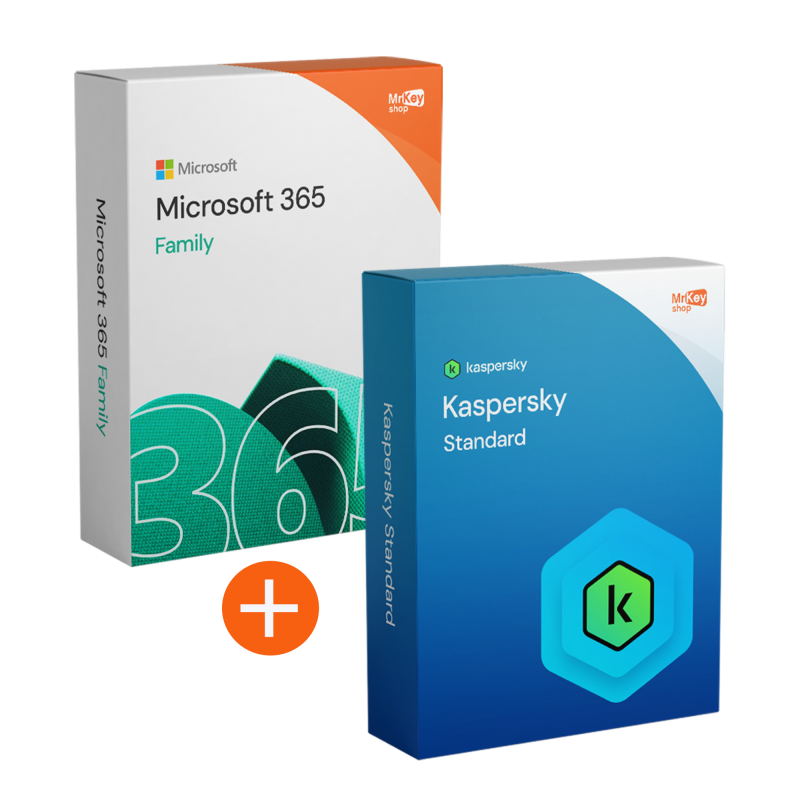
Dieses Bundle ist für alle gedacht, die eine Komplettlösung für ihr digitales Alltagsleben suchen: einerseits Microsoft 365 Family zum Erstellen und Verwalten von Dokumenten, Tabellen, Präsentationen und Inhalten, andererseits Kaspersky Standard zur Reduzierung der häufigsten Risiken beim Surfen, E-Mailen und Herunterladen. Die Idee ist einfach: weniger „verstreute” Tools, mehr Kontinuität zwischen den Aktivitäten und aktiver Schutz für die am häufigsten verwendeten Geräte im Haushalt.
Darüber hinaus ist der Schutz durch Kaspersky Standard (5 Geräte / 1 Jahr) ideal, wenn PCs und Geräte von verschiedenen Personen gemeinsam genutzt oder verwendet werden: Eine einzige Lizenz hilft dabei, einen einheitlichen Sicherheitsstandard aufrechtzuerhalten, ohne separate Aktivierungen und fragmentierte Auswahlmöglichkeiten verwalten zu müssen. Mit Mr Key Shop erhalten Sie eine digitale Lieferung, klare Anweisungen und kostenlosen Support in Italienisch und Englisch, um die Installation und Aktivierung reibungslos abzuschließen.
Wir haben dieses Bundle entwickelt, um ein konkretes Problem zu lösen: Zu Hause oder in einem kleinen „familiären” Team wird auf mehreren Geräten gearbeitet und gelernt, oft mit unterschiedlichen Gewohnheiten und unterschiedlichem Aufmerksamkeitsniveau. Das Ergebnis ist ohne klare Einrichtung vorhersehbar: unübersichtliche Konten, verstreute Dateien, schnell zu verwaltende Anhänge und vor allem ein erhöhtes Risiko durch Links, E-Mails und Downloads.
Die Kombination aus Microsoft 365 Family (mit Produktschlüssel) und Kaspersky Standard für 5 Geräte/12 Monate wurde entwickelt, um eine übersichtlichere Basis zu schaffen: Microsoft-Tools, die für die täglichen Aufgaben immer verfügbar sind, und aktiver Schutz auf den wichtigsten Geräten. Diese Kombination wurde entwickelt, um Unterbrechungen und unvorhergesehene Ereignisse zu reduzieren und Ihnen zu helfen, eine langfristig stabilere digitale Routine aufrechtzuerhalten.
Das Bundle Microsoft 365 Family + Kaspersky Standard (5 Geräte / 1 Jahr) ist für Umgebungen gedacht, in denen mehrere Personen mehrere Geräte nutzen und ein Gleichgewicht zwischen Produktivität und Sicherheit erforderlich ist: Familien, Paare, Studenten zu Hause, kleine Home-Offices und alle, die Dokumente und tägliche Aufgaben auf verschiedenen PCs verwalten.
Wenn Sie nach einem Paket suchen, das Produktivität auf mehreren Geräten und Schutz für bis zu 5 Geräte mit einer einzigen jährlichen Laufzeit abdeckt, ist diese Kombination genau auf diese Anforderungen zugeschnitten.
Hier finden Sie die wichtigsten Punkte der beiden enthaltenen Softwareprogramme: Microsoft 365 Family für die kontinuierliche Verwaltung von Aktivitäten und Dokumenten und Kaspersky Standard für den Schutz von bis zu 5 Geräten für 12 Monate. Eine praktische Kombination für alle, die sofortige Ergebnisse und einen klaren Aktivierungsprozess wünschen.
|
Software |
Hauptmerkmale |
Vorteil für Ihren Workflow |
|
Microsoft 365 Family (Produktschlüssel) |
|
|
|
Kaspersky Standard (5 Geräte / 1 Jahr) |
|
|
Wenn Sie sich für dieses Bundle entscheiden, erhalten alle Familienmitglieder (bis zu 6 Benutzer) einen privaten Speicherplatz von 1 TB auf OneDrive, insgesamt also 6 TB Cloud-Speicher. Während Microsoft 365 Ihre Erinnerungen, Arbeitsdokumente und Schulunterlagen schützt, fungiert Kaspersky Standard als wachsamer Wächter: Es scannt jede Datei in Echtzeit vor dem Hochladen und stellt so sicher, dass keine Malware Ihr Cloud-Backup oder die zwischen den verschiedenen Geräten in Ihrem Haushalt geteilten Dateien infizieren kann.
Das digitale Leben einer Familie beschränkt sich nicht nur auf den Computer zu Hause. Aus diesem Grund erweitert die im Paket enthaltene Kaspersky Standard-Lizenz den Schutz auf 5 Geräte, darunter Android- oder iOS-Smartphones und -Tablets. Sie können das Surfen Ihrer Kinder auch unterwegs sichern und sie vor Phishing per SMS (Smishing) und bösartigen Apps schützen. Ganz gleich, ob Sie eine Excel-Datei auf Ihrem Laptop bearbeiten oder Ihre E-Mails auf Ihrem Smartphone abrufen, Sie können sich auf einen konsistenten und undurchdringlichen Schutz auf jedem Bildschirm verlassen.
Wenn Sie bereits ein aktives Microsoft 365-Abonnement haben, können Sie mit dem in diesem Bundle enthaltenen Produktschlüssel Ihre aktuelle Laufzeit ganz einfach um weitere 12 Monate verlängern. Sie müssen weder Anwendungen neu installieren noch Ihre Dateien verschieben: Lösen Sie einfach den Code in Ihrem Microsoft-Konto ein, um die Kontinuität Ihres Betriebs zu gewährleisten. Dies ist die ideale Lösung für alle, die eine stressfreie Verwaltung ihrer Produktivität zu Hause suchen und sicherstellen möchten, dass ihre Arbeits- und Lernwerkzeuge immer auf dem neuesten Stand und einsatzbereit sind.
Wenn Sie bei Mr Key Shop einkaufen, entscheiden Sie sich für ein transparentes und sicheres Einkaufserlebnis, das Ihnen eine reibungslose Aktivierung garantiert. Sie können sich auf den Schutz von Trusted Shops (Deckung bis zu 2.500 € pro Bestellung) und auf verifizierte Bewertungen verlassen, die die Qualität des Service und des Kundendienstes bestätigen: ein konkreter Vorteil, wenn Sie mehrere Geräte konfigurieren müssen und keine Zeit verlieren möchten.
Die Zahlungen sind durch SSL-Verschlüsselung geschützt und Sie können zwischen verschiedenen sicheren Zahlungsmethoden wählen: PayPal (auch in 3 Raten), Klarna, Amazon Pay, Apple Pay, Google Pay, Discover und Kredit-/Debitkarten über Stripe sowie weitere Zahlungsmethoden, die an der Kasse verfügbar sind. Darüber hinaus profitieren Sie von einer Geld-zurück-Garantie und kostenlosem technischen Support in Italienisch und Englisch, sowohl vor als auch nach dem Kauf.
Die Lieferung erfolgt digital: eine umweltfreundliche Wahl, die unnötigen Versand und Verpackungen vermeidet und Ihnen einen sofortigen Start ermöglicht. Wenn Sie Ihr Setup mit ergänzenden Tools aus dem Mr Key Shop vervollständigen möchten, sollten Sie auch NordVPN für eine vertraulichere Verbindung, Norton 360 Premium als Schutzalternative, EaseUS ToDo Backup für übersichtlichere Backups und Canva Pro für mehr Kreativität.
Bringen Sie Ihr Unternehmen mit einem soliden und anerkannten Partner im Bereich der Original-Softwarelizenzen auf ein neues Niveau. Mit Mr Key Shop erhalten Sie Zugang zu exklusiven Preislisten für Wiederverkäufer, Sonderkonditionen und kostenlosem professionellem Support für Sie und Ihre Kunden.>
Darüber hinaus können Sie mit MrKeyWalletbei jeder Aufladung zusätzliche Gutschriften erhalten und Ihre Margen weiter steigern: Je mehr Sie investieren, desto mehr verdienen Sie. Ein System für alle, die wirklich wachsen wollen.
Treten Sie jetzt dem Programm für Wiederverkäufer MKreseller bei und entdecken Sie alle Vorteile, die Partnern vorbehalten sind.
Systemanforderungen für Microsoft 365 Family (Anforderungen für PC, Mac und Mobilgeräte)
Microsoft 365 erfordert eine ständige Internetverbindung für die Aktivierung, Updates und den Zugriff auf Cloud-Dienste (OneDrive/Outlook).
Kaspersky Standard (Schutz für mehrere Geräte)
Kaspersky Standard erfordert ein leichtes, aber aktuelles System, um Echtzeit-Scans durchzuführen, ohne Office-Anwendungen zu verlangsamen.
Nach der Bestellung erhalten Sie alles per E-Mail mit digitaler Lieferung: den Produktschlüssel für Microsoft 365 Family, zuverlässige Anweisungen zum Herunterladen und klare Anweisungen, um die Schritte korrekt auszuführen. Für Kaspersky Standard erhalten Sie nützliche Informationen zum Herunterladen über die angegebenen Kanäle und zur Installation ohne Risiken durch falsche Versionen oder unzuverlässige Dateien.
Die Installation ist assistiert und so konzipiert, dass Fehler und Zeitverlust reduziert werden. Für Microsoft 365 Family können Sie nach Einlösen des Produktschlüssels die Apps installieren, indem Sie die Schritte in der Anleitung befolgen. Für Kaspersky Standard installieren Sie die Software auf den Geräten, die Sie schützen möchten (bis zu 5), indem Sie die Schritt-für-Schritt-Anleitung befolgen. Wenn Sie Konflikte mit einem bereits vorhandenen Antivirenprogramm feststellen, wird empfohlen, dieses zuerst zu entfernen und neu zu starten.
Die Aktivierung ist der Schritt, der alles funktionsfähig macht. Für Microsoft 365 Family aktivieren Sie das Produkt, indem Sie den Produktschlüssel in Ihrem Microsoft-Konto einlösen und dann die Installationen und Geräte in den Kontoeinstellungen verwalten. Für Kaspersky Standard schließen Sie die Aktivierung gemäß den Anweisungen ab, damit der Schutz auf den ausgewählten Geräten aktiviert wird. Wenn etwas nicht stimmt (z. B. falsches Konto oder blockierte Aktivierung), hilft Ihnen der kostenlose technische Support in Italienisch und Englisch, den Vorgang schnell abzuschließen.
Was erhalte ich beim Kauf des Bundles bei Mr Key Shop?
Sie erhalten per E-Mail die digitale Lieferung mit allem, was Sie benötigen: den Produktschlüssel für Microsoft 365 Family, Anweisungen für den sicheren Download, vollständige Anweisungen für die Installation und Aktivierung sowie die Details der Lizenz für Kaspersky Standard (5 Geräte / 1 Jahr). Kostenloser technischer Support in Italienisch und Englisch ist inbegriffen.
Ist der 1 TB Speicherplatz auf OneDrive gemeinsam oder hat jedes Familienmitglied seinen eigenen? *
Jedes Familienmitglied erhält seinen eigenen privaten Speicherplatz von 1 TB. Die Privatsphäre ist vollständig gewährleistet: Keines der anderen Mitglieder kann Ihre persönlichen Dateien sehen, es sei denn, Sie entscheiden sich ausdrücklich dafür, diese in einem gemeinsamen Ordner freizugeben.
Schützt Kaspersky Standard auch vor Viren, die per E-Mail über Outlook übertragen werden?
Selbstverständlich. Kaspersky scannt automatisch verdächtige Anhänge und Links in Outlook (im Paket enthalten) und blockiert Phishing-Versuche und Bedrohungen, noch bevor sie geöffnet werden können.
Kann ich den Produktschlüssel verwenden, um von einem Personal-Tarif zu einem Family-Tarif zu wechseln?
Ja. Wenn Sie den Family-Code in Ihrem Microsoft Personal-Konto einlösen, wird Ihr Tarif automatisch in einen Family-Tarif umgewandelt und die Laufzeit gemäß den offiziellen Richtlinien von Microsoft neu berechnet.
Wie aktiviere ich Microsoft 365 Family mit dem Produktschlüssel?
Melden Sie sich bei Ihrem Microsoft-Konto an und lösen Sie den Code gemäß den Anweisungen ein. Sobald das Abonnement aktiv ist, können Sie Installationen und Geräte über die Kontoeinstellungen verwalten.
Ich habe bereits ein aktives Microsoft-Abonnement: Kann ich den Produktschlüssel trotzdem verwenden?
Das hängt von der Art Ihres bestehenden Abonnements und den Bedingungen Ihres Kontos ab. In einigen Fällen kann der Code den Tarif verlängern oder ersetzen, in anderen Fällen muss er sorgfältig verwaltet werden, um Überschneidungen zu vermeiden. Wenn Sie sich nicht sicher sind, wenden Sie sich an den Support: Wir helfen Ihnen bei der Auswahl des richtigen Weges.
Kaspersky Standard: Wie viele Geräte sind abgedeckt und für wie lange?
Die enthaltene Lizenz deckt bis zu 5 Geräte für 12 Monate ab. Um den Umfang oder die Dauer zu verlängern, benötigen Sie eine andere Lizenz.
Kann ich Kaspersky auf einem Gerät installieren und später weitere Geräte hinzufügen?
Ja: Sie können das Programm zu unterschiedlichen Zeitpunkten auf den Geräten installieren und aktivieren, bis die in der Lizenz vorgesehene Grenze erreicht ist. Befolgen Sie immer die Anweisungen, um doppelte Aktivierungen oder Aktivierungen auf unerwünschten Geräten zu vermeiden.
Was tun, wenn auf dem PC bereits ein Antivirenprogramm installiert ist?
Um Konflikte zu vermeiden, wird empfohlen, das bereits vorhandene Antivirenprogramm zu deinstallieren, den Computer neu zu starten und dann Kaspersky Standard zu installieren. Im Zweifelsfall können Sie Support für eine „saubere” Vorgehensweise anfordern.
Benötige ich eine Internetverbindung, um Microsoft 365 und Kaspersky zu nutzen?
Eine Internetverbindung ist in der Regel für den Download und die Erstaktivierung erforderlich. Aus Sicherheitsgründen wird sie auch für Updates und Echtzeitschutz empfohlen, je nach den Einstellungen der Software.
Ist der technische Support auch nach dem Kauf inbegriffen?
Ja. Der technische Support ist kostenlos und steht auch nach dem Kauf in italienischer und englischer Sprache zur Verfügung, um Ihnen bei Fragen zur Installation, Aktivierung oder zu Verfahren zu helfen.


 138,54 $
515,84 $
138,54 $
515,84 $
 94,85 $
133,21 $
94,85 $
133,21 $


 Chatten Sie mit uns
 Ita
Ita
 Eng
Eng
 Deu
Deu
 Esp
Esp
 Fra
Fra