


 Unfortunately your shopping cart is empty


 Returns
 Chat with Us
 About Us
 My Orders

 Twitter
 LinkedIn
 Meta
Meta



 €61.99
€108.99
€61.99
€108.99







|
Important note:
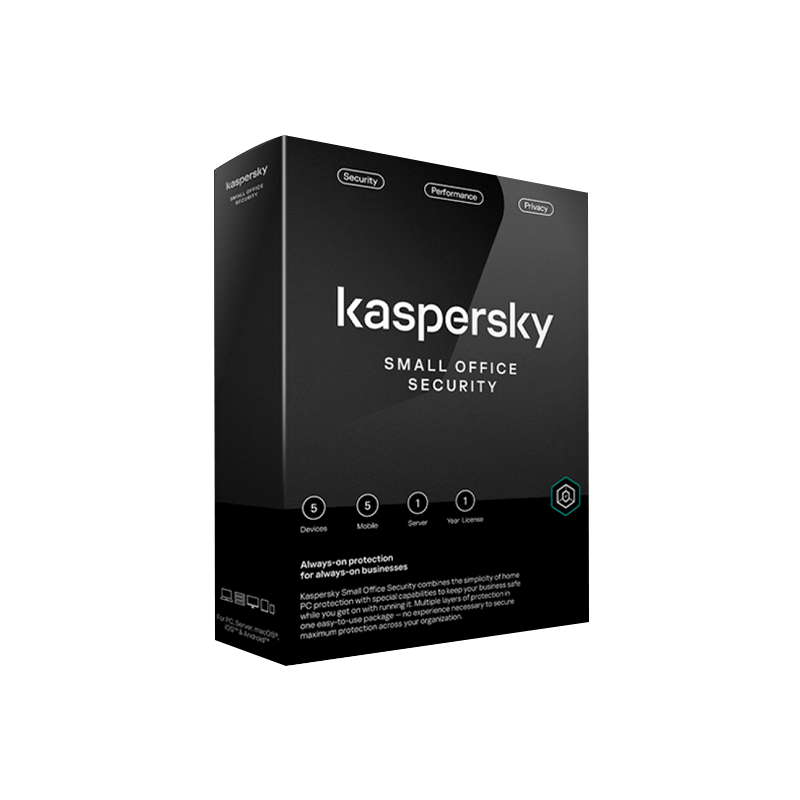
Additionally, the term “Device” identifies the license size and should not be interpreted as the direct sum of all activatable devices: to choose the correct version based on coverage (Desktop/Server/Mobile), always refer to the summary table below. |
Choosing to buy a Kaspersky Small Office Security license on Mr Key Shop means equipping your business with enterprise-level protection, combined with the ease of use of home software. KSOS is the only suite specifically designed for micro and small businesses (up to 50 users), capable of securing computers, file servers, and mobile devices without requiring advanced IT expertise. Thanks to instant digital delivery, you will receive your activation code and technical guide via email in seconds, ensuring Zero Downtime for your operations.
KSOS is not just an antivirus, but a proactive defense ecosystem that neutralizes threats before they impact revenue.
This feature acts as insurance against business downtime caused by data hijacking.
|
Tool |
Technical Function |
Business Benefit |
|
Behavior Monitoring |
Heuristic analysis of suspicious processes. |
Blocks encryption attempts before they spread across the network. |
|
Data Rollback |
Automatic restoration of modified files. |
Reverses attack damage by restoring original documents. |
Protects company cash flow by preventing credential theft during financial operations.
|
Tool |
Technical Function |
Business Benefit |
|
Protected Browser |
Launches an isolated and secure sandbox. |
Prevents keyloggers and spyware from intercepting passwords and credit cards. |
|
Website Verification |
Authenticity certificate checks. |
Ensures payment portals are not fraudulent clones. |
A dedicated defense for the core of business data, preventing infections from spreading among employees.
|
Tool |
Technical Function |
Business Benefit |
|
Shared Data Protection |
Active protection against malware and exploits. |
Keeps file servers secure without degrading network performance. |
|
Access Control |
Monitoring intrusion attempts. |
Prevents unauthorized access to sensitive office documents. |
Allows centralized management without the need for a dedicated system administrator.
|
Tool |
Technical Function |
Business Benefit |
|
Centralized Control |
Cloud portal for managing all nodes. |
Monitor PCs, Servers, and Mobile devices from a single intuitive interface. |
|
Remote Management |
Instant deployment of updates and policies. |
Block threats across all company devices with a single click. |
|
Variant |
Type |
Included coverage |
|
5 Device |
Base/Renewal |
5 Desktop + 1 Server + 5 Mobile |
|
10 Device |
Base/Renewal |
10 Desktop + 1 Server + 10 Mobile |
|
15 Device |
Base/Renewal |
15 Desktop + 2 Server + 15 Mobile |
|
20 Device |
Base/Renewal |
20 Desktop + 2 Server + 20 Mobile |
|
25 Device |
Base/Renewal |
25 Desktop + 3 Server + 25 Mobile |
Buying Kaspersky SOS on Mr Key Shop means optimizing your IT budget without sacrificing compliance and support:
Kaspersky Small Office Security (KSOS) is built on an architecture that prioritizes automation, while under the hood offering tools derived from Kaspersky’s Enterprise solutions.
Here are the technical details divided by area:
Unlike home versions, KSOS is managed through the Business Hub (cloud-based).
For Android business devices, KSOS offers:
In daily work, threats rarely appear “in plain sight”: they often come as email attachments, seemingly reliable links, shared files, or payment portals. KSOS is designed to intercept these situations before they disrupt operations.
Here are some examples:
Standard protection may be sufficient for basic needs. KSOS is ideal when you need full operational protection including payments, credentials, and data.
| Feature | Basic Protection | Kaspersky Small Office Security |
| Target | Home users | Small businesses |
| Management | Individual | Cloud centralized |
| Server Protection | Not supported | Included |
| Anti-Ransomware | Detection only | Automatic rollback |
| Transactions | Basic protection | Safe Money |
| Data Protection | None | AES-256 encryption |
| Password | Browser only | Password Manager included |
| Web Control | Limited | Category filtering |
| Mobile | Basic | Advanced protection |
<
Kaspersky Small Office Security is ideal for those who want to strengthen the protection of their work activities and reduce risks related to email, browsing, and online operations, while maintaining a clear and manageable user experience. At Mr Key Shop, you'll find a one-stop shop for purchasing original software with simple procedures: you'll receive everything you need to get started digitally, with detailed instructions designed to make downloading and activation seamless even in intensive operating environments.
Mr Key Shop has been operating in the digital sector for over 18 years and selects only genuine licenses, distributed through official channels and accompanied by comprehensive instructions. Each transaction is protected by SSL encryption and supported by reliable payment methods. The store's reliability is confirmed by customer reviews and Trusted Shops certification, which includes a money-back guarantee of up to €2,500, adding an extra layer of protection during your purchase.
Kaspersky Small Office Security is part of a broader software ecosystem, useful for completing your setup with tools dedicated to productivity and document management. You can combine, for example, Windows 11 Pro for a work-oriented operating system, Office 2024 Professional for creating and managing documents, Swifdoo PDF for PDFs and NordVPN to add a layer of protection to your connection. All products are provided via immediate digital delivery, an efficient and sustainable choice that allows you to receive everything via email in just a few minutes.
Choosing Mr Key Shop means relying on a specialized store that focuses on clarity, security, and operational continuity, with free technical support in Italian ready to assist you whenever you need it.
Take your business to the next level with a solid and recognized partner in the original software licensing industry. With Mr Key Shop, you get access to exclusive price lists for resellers, special terms, and free professional support for you and your customers.
What's more, with MrKeyWallet, you can get extra credits on every top-up and further increase your margins: the more you invest, the more you earn. A system designed for those who really want to scale up.
Join the MKreseller programnow and discover all the benefits reserved for partners.
Windows
Mac
After purchase, you will receive an activation code, a download link and a quick guide via email. Before proceeding, make sure you have:
If in doubt, Mr Key Shop's free technical support in Italian is available to help you complete the procedure.
What will I receive when I purchase Kaspersky Small Office Security?
You will receive an email containing the activation code, the download link and instructions for installation and activation. The invoice and access to Mr Key Shop's free technical support are also included.
Is it suitable for a work environment?
Yes: it is designed to protect typical workflows, such as browsing, accessing online services, managing credentials and sensitive operations (e.g. payments or confidential portals), reducing the risk of phishing and malware.
How is it different from a “basic” antivirus?
In addition to protection from threats, it includes tools focused on activities that are often critical in the workplace: transaction protection, password management, data protection features (backup/restore and encryption components) and useful controls to reduce the impact of incidents.
Can I install it on a device that is already running?
Generally, yes. To avoid conflicts and slowdowns, it is advisable to remove any previous antivirus software and restart the system before installing Kaspersky.
Do I need the Internet to use it?
An Internet connection is normally required for downloads, activation and updates. Protection remains active during use, but is most effective when definitions and components are up to date.
Does it affect PC performance?
The suite is designed to work in the background and maintain a low impact. If you notice slowdowns, it usually helps to complete the initial update, schedule scans during non-working hours, and check for conflicts with other security software.
What should I do if the code is not accepted?
Check that you have copied and pasted the code without any extra characters and that you have entered it in the correct section (Licence/Activation). If the error persists, contact Mr Key Shop's free technical support in Italian: we will help you resolve the issue quickly.
How do I check that protection is active?
Open the programme and check the status on the main screen: it usually indicates whether protection is active, whether there are any pending updates or recommended actions (e.g. an initial scan).
Can proxies, firewalls or IT policies interfere?
Yes, in some restrictive environments, activation and updates may be limited. If you notice any blocks or connection errors, check your network rules or ask your IT department to allow the necessary services.


 €109.99
€483.99
€109.99
€483.99


 Chat with us
 Ita
Ita
 Eng
Eng
 Deu
Deu
 Esp
Esp
 Fra
Fra