


 Unfortunately your shopping cart is empty


 FAQs
FAQs
 Returns
 Chat with Us
 About Us

 Twitter
 LinkedIn
 Meta
Meta
 Copy Link


 $95.91
$106.57
$95.91
$106.57
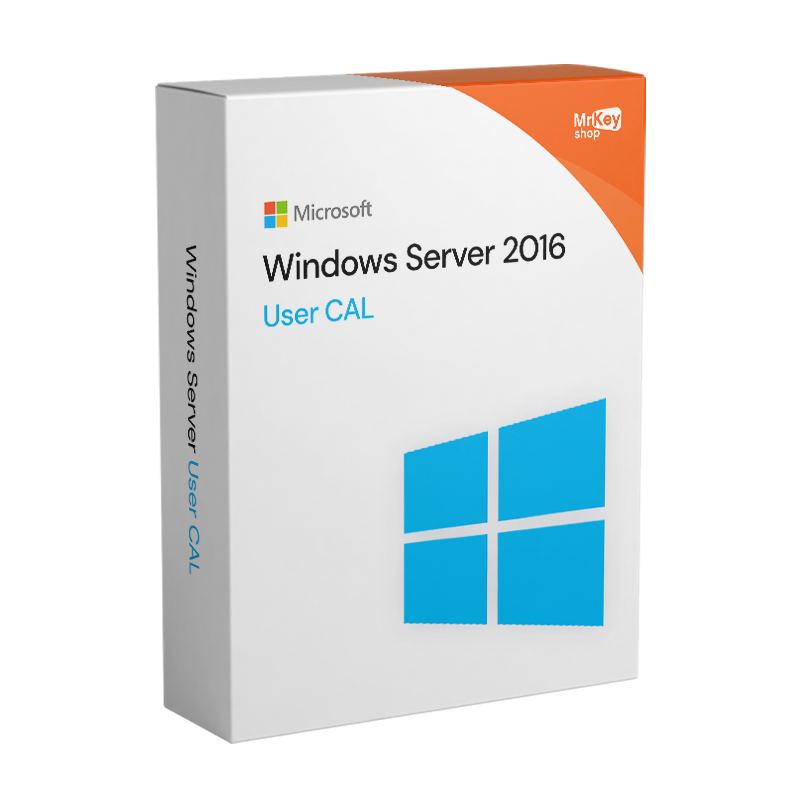





With Mr Key Shop, you can buy the Windows Server 2016 USER CAL licenses and immediately receive the USER CALs for your Business. Save over the price list, enjoy our Instant Digital Delivery System, and activate all the licenses you need with no downtime. These are the benefits of Mr Key Shop, your one-stop-shop for the Digital Market!
WARNING: This page only relates to the USER CAL licenses for Windows Server 2016, you can order in bundles including 1-50 units if you need to allocate licenses to single users with unique credentials. Instead, if you need to assign licenses to nominal devices, visit the page for DEVICE CAL licenses, also available in bundles of 1-50 licensee. Alternatively, visit the product page for Microsoft Windows Server 2016 if you need a license for this server software. In case of doubt about the amount or type of CAL licenses you need to order, contact our free English-speaking Customer Service, our team will be at your full disposal.
Shop from Mr Key Shop for your Windows Server 2016 USER CAL licenses with confidence and activate them in no time. With us, you only pay via secure and tracked methods provided by reliable platforms like PayPal, Stripe, and Pay services from Amazon, Google, e Apple. Plus, each order is covered by our full money-back warranty; Mr Key Shop always ensures total reliability. At the end of your secure transaction, you’ll get a recap email from our consolidated Instant Digital Delivery System, where you’ll find all you need to activate and deploy your Windows Server 2016 USER CAL licenses without external help: USER CAL license bundle, clear and simple instructions with all you need to know to proceed, and your invoice. In case of doubt, issues, or questions, our Technical Support will be more than happy to assist you, in English and with no extra fees!
Mr Key Shop has opened the doors to the Digital World for over 18 years. We’ve been among the first companies to adopt Digital Delivery as an exclusive business model and time proved us right: more than 350k happy clients in the world and a rating of Excellent on TrustPilot. We gained our customers’ trust by providing fast, professional and always reliable service. We offer only genuine premium software licenses, support our clients in each stage, from purchase to post-selling with our professional and responsive Customer Service, and ensure Immediate Seamless Delivery. Shop with confidence for the best software products like Windows Server 2016 USER CALs from Mr Key Shop, you’ll get to the Digital World saving time and money!
Our team of experts is not committed only to ensuring timeliness, cost-effectiveness, and professionalism. They also ensure our Digital Delivery System always sends your products within a few seconds, allowing both you and us to be 100% Eco-Friendly! With Mr Key Shop, you can save over the price list, cut downtime (no courier, no delays, no lost parcels), and enjoy our order for Windows Server 2016 USER CALs right away; furthermore, you’ll help us reduce pollution and waste. Three benefits for you and the environment! Mr Key Shop is a Green Company, just like yours!
Once your order your Windows Server 2016 USER CALs, we’ll send your recap email to your inbox, with the following:
Windows Operating Systems: Windows 11 - Windows 10 - Windows 8 - Windows 7
Microsoft Office packages: Office 2024 - Office 2021 - Office 2019 - Office 2016 - Office 2013 - Office 2010 - Office for MAC - Microsoft 365 - Office App - Visual Studio - Project - Access - Visio - Outlook - Word - Excel - PowerPoint
Antivirus: Kaspersky - ESET - McAfee - Avast -Bitdefender - Norton - AVG - Acronis - Surfshark- IObit - Watchdog - Panda - Server Antivirus
VPN: HMA VPN - NordVPN - Surfshark - Cyberghost
Microsoft Server: Server 2025 - Server 2022 - Server 2019 - Server 2016 - Server 2012 - Storage Server 2016 - Storage Server 2012 - Server CAL - RDS CAL Server - SQL Server
Utilities: PDF converters - Disk Cleanup - Data Management - Screen Recorder - Invoicing Software - Backup Software - Data Recovery - Disk Partitioning - Deployment - 3D Modeling - Remote Desktop - Editing -Video Converter - Virtualization - Graphics
CAD: Autodesk - ZWSOFT – Rhino 3D - Ashampoo
Bundle: Software for Creators - Software for Gamers - Software for the Family - Software for Smart Working - Software Bundle for SMEs & Startups - Software bundle for students
Take your business to the next level with a solid and recognized partner in the original software licensing industry. With Mr Key Shop, you get access to exclusive price lists for resellers, special terms, and free professional support for you and your customers.
What's more, with MrKeyWallet, you can get extra credits on every top-up and further increase your margins: the more you invest, the more you earn. A system designed for those who really want to scale up.
Join the MKreseller programnow and discover all the benefits reserved for partners.
|
Requirement |
Details |
|
Compatible server |
Windows Server 2016 (Standard, Datacentre, Essentials) |
|
Licence type |
User CAL: authorises one named user on an unlimited number of devices |
|
Alternative |
Device CAL: authorises one specific device for an unlimited number of users |
|
RDS CAL Management |
Requires Remote Desktop Services Licence Management on the server |
|
Single user’s devices |
Unlimited: PCs, laptops, tablets, smartphones, thin clients |
|
Client-side requirements |
No specific hardware requirements for the CAL; depends on the RDP client used |
|
Compliance |
Each User CAL must be assigned to a named user and documented |
|
Version compatibility |
Valid for Windows Server 2016; also covers earlier versions through backwards compatibility |
|
Support status |
Microsoft Extended Support valid until 12 January 2027 |
Microsoft Windows Server 2016 User CAL is not software to be installed on the user’s device: it is a licence that authorises a named user to access the services of the Windows Server 2016 server from whichever device they use. After purchasing from Mr Key Shop, you will receive the product key and licence documentation via email. There is no installation file associated with the client-side CAL: registration takes place on the server via the Remote Desktop Services Licence Manager for RDS User CALs, or via the compliance records for standard access CALs to Windows Server 2016 services.
The User CAL does not require any installation on the authorised user’s device. On the Windows Server 2016 server, RDS User CALs are registered in the Remote Desktop Services Licence Manager, which can be accessed via the server’s Remote Administration Tools. For Standard Access CALs, compliance is managed through documentation: each User CAL must be assigned to an identifiable named user and tracked in the organisation’s licence records. Verification takes place during Microsoft audits and not via automatic technical checks that restrict access in the absence of CALs registered on the client.
The product key received by email from Mr Key Shop serves as proof of purchase and the User CAL licence document. Keep it in your organisation’s licence compliance records. For RDS User CALs, activation takes place in the server’s RDS Licence Manager: launch the licence installation wizard, select the programme type, enter the code and specify the number of CALs purchased. The server records the available licences and assigns them to users in accordance with the policy defined by the administrator. For standard CALs providing access to Windows Server services, registration is documentary and does not require the code to be entered into a dedicated console.
|
Feature |
User CAL |
Device CAL |
|
Authorises |
One named user |
One specific device |
|
Devices per licence |
Unlimited |
One |
|
Users per licence |
One |
Unlimited |
|
Ideal scenario |
Users with multiple devices (PC + laptop + mobile) |
Workstations shared across multiple shifts or users |
|
Traceability |
By username |
By device ID |


 $95.91
$106.57
$95.91
$106.57
 $84.19
$133.21
$84.19
$133.21
 $213.15
$255.78
$213.15
$255.78
 $223.81
$266.44
$223.81
$266.44
 $94.85
$133.21
$94.85
$133.21

 Chat with us
 Ita
Ita
 Eng
Eng
 Deu
Deu
 Esp
Esp
 Fra
Fra