


 Unfortunately your shopping cart is empty


 Returns
 Chat with Us
 About Us
 My Orders

 Twitter
 LinkedIn
 Meta
Meta

 $94.85
$266.44
$94.85
$266.44




Receive an alert when the product is back.
 Please enter an email address
Please accept the terms and conditions
Please enter an email address
Please accept the terms and conditions
| Sold by: | YouSoftware |
| License: | 1 User/Computer |
| Region: | Worldwide |
| Languages: | All Languages Included |

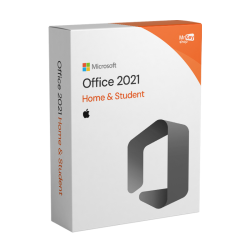
Purchase a Microsoft Office 2021 Home & Student licence for Mac from Mr Key Shop: finally, the new version for families and students of the beloved Microsoft suite is now available for Mac! If you don't want to give up the convenience and benefits of Office 2021 on your Mac, this is the right edition to choose (Microsoft guarantees official support and compatibility with the three most recent versions of MacOS).

Many users underestimate the activation phase, but it is precisely this process that guarantees the longevity and security of your software investment.
Here are the technical and security reasons why activating an original licence purchased from Mr Key Shop is essential:
Without valid activation via a Product Key, the suite enters ‘Read-Only’ mode.
An unactivated or ‘cracked’ Office is the number one risk to the security of your device.
Official activation gives you legitimate user status, unlocking essential protections:
|
Features |
Activated Software (Original) |
Non-Original Software (Crack) |
|
File Saving |
✅ Always available |
❌ Disabled or unstable |
|
Malware Protection |
✅ Integrated with MS Update |
❌ High virus risk |
|
Technical Support |
✅ Included (Mr Key Shop) |
❌ Non-existent |
|
Legality |
✅ 100% Compliant |
❌ Illegal and punishable by law |
This suite is the perfect combination of the elegance of macOS and the productive power of Microsoft, offering a definitive solution for those who want to study and work with their family without the burden of a subscription.
|
Application |
Mac-specific innovation |
Student benefits |
|
Word 2021 for Mac |
Full Cross-Platform Compatibility |
Read and edit files from Windows without formatting errors. |
|
Excel 2021 for Mac |
XLOOKUP & LET Function |
Analyse complex data with the speed of Apple Silicon chips (M1, M2, M3, M4). |
|
PowerPoint 2021 for Mac |
Recording and Slide Links |
Create multimedia lessons and share specific points in your work with a single click. |
|
OneNote 2021 for Mac |
Integration with the ecosystem |
Synchronise notes between iPhone, iPad and Mac in real time. |
Despite being a ‘lifetime’ licence, Office 2021 for Mac allows for simultaneous collaboration. Thanks to cloud synchronisation, you can see your study partners' changes as they happen, add custom comments, and manage workflows without having to send dozens of different versions of the same file.
Maximum compatibility is guaranteed. In 2026, flexibility is key: official support for OpenOffice formats allows you to collaborate with anyone, regardless of the software they use, ensuring that your work is always accessible.
The user interface has been redesigned to blend in with Apple's design language. Take advantage of Trackpad gestures and Retina display resolution for a crisp visual experience and superior eye comfort, which is essential during long research sessions.
To keep your Mac fast and secure while using Office 2021, it is essential to integrate high-level protection tools. We recommend shielding your documents and browsing with a Kaspersky Premium licence or an ESET Home Security Premium subscription. If you use your Mac at university or in public places, using NordVPN is essential for encrypting your data.
For PDF management, the ideal combination is the SwifDoo PDF lifetime licence for Mac, while to make your PowerPoint presentations graphically flawless, we suggest using Canva Pro and the advanced photo editing of Luminar Neo. Finally, don't risk losing your files: use a professional backup software such as EaseUS Todo Backup for Mac (for your Windows partitions via Boot Camp or Parallels) and record your screen lessons with AWZ Screen Recorder Pro.
Purchasing a licence for Mac requires attention to compatibility and longevity, aspects that Mr Key Shop guarantees with the highest standards.
The licences provided by Mr Key Shop for the 2021 version are fully compatible with the M1, M2, M3 and M4 architecture. By purchasing from us, you can be sure that you are downloading the correct version that takes full advantage of the speed of Apple chips, ensuring superior energy savings and instant app opening.
Avoiding recurring costs is a priority for many families and students.
If you decide to purchase Office Home and Student 2021 from Mr Key Shop, once the transaction is complete, you will receive an e-mail with the following:
Take your business to the next level with a solid and recognized partner in the original software licensing industry. With Mr Key Shop, you get access to exclusive price lists for resellers, special terms, and free professional support for you and your customers.
What's more, with MrKeyWallet, you can get extra credits on every top-up and further increase your margins: the more you invest, the more you earn. A system designed for those who really want to scale up.
Join the MKreseller programnow and discover all the benefits reserved for partners.
| Operating System | macOS 12 Monterey, macOS 13 Ventura, macOS 14 Sonoma |
| CPU | 1GHZ dual-core processor |
| GPU | DirectX 9 or higher WDDM 2.0 or higher. |
| Memory | 4GB RAM |
| Storage | 4GB of free space |
| Display | min. resolution of 1280 x 768. |
| Browser | up-to-date versions of Safari, Chrome, or Firefox |
Download Microsoft Office Home and Student 2021 for Mac from Mr Key Shop! Save over the MSRP and get your order via email in a few seconds: you’ll be provided with a link to the official installation file, just click on it and the job is done. You will need no external help using our complete and straightforward guide. You’re not alone, however! In case of need, you can rely on our free English-speaking Customer Service! Enjoy shopping on Mr Key Shop with full confidence: we only provide secure and tracked payment methods, with a full money-back warranty. Read more about our services by our thousands of positive feedbacks on TrustPilot!

You can install Microsoft Office Home and Student 2021 for Mac just by launching the installation file you’ve downloaded and following the instructions. Mr Key Shop makes your life easier and truly believes in its Eco-Friendly values. By purchasing your Microsoft Office Home and Student 2021 for Mac digital license, you’ll get your order in your inbox within a few seconds. Our digital delivery strategy allows us to ensure instant order processing, avoiding delivery costs and reducing our footprint. You won’t have to wait for the courier and we can reduce the pollutants and waste generated by delivery vehicles. Together, we can be 100% green!
To activate Office 2021 Home & Student for Mac using the product key purchased from Mr Key Shop, stick to the following procedure:
Preliminary step
If on the next screen the program prompts you to verify the account you used, click on the "Return to Subscriptions" button.
Activation procedure
You will find these instructions attached to your order summary email. But if you have any doubts, questions or problems, don't hesitate to contact our technical support, which is always available free of charge and in English.
1. What does Office 2021 Home & Student for Mac include?
Office 2021 Home & Student for Mac includes full versions of Word, Excel, and PowerPoint, ideal for home and academic use. Outlook, Access, and Publisher are not included.
2. Office 2021 Home & Student for Mac: is it a subscription or a perpetual licence?
This version is a perpetual licence, so you pay once and can use it forever with no recurring costs.
3. Can I use Office 2021 Home & Student on multiple devices?
No, the licence is valid for one Mac device only.
4. Do I need an internet connection to use Office?
The internet is only required for initial installation and activation. After activation, the applications work offline. 5. Can I transfer the licence to another Mac? Yes, you can transfer the licence to a new Mac, but you must first deactivate it from the previous device.
6. Is access to the cloud or OneDrive included?
No, this version does not include cloud services such as OneDrive or Microsoft Teams.
7. Will I receive future updates?
Yes, Microsoft provides security updates and fixes, but not updates to future versions of Office.
8. Who is Office 2021 Home & Student for Mac recommended for?
It is perfect for students, teachers, and families who need essential applications for documents, spreadsheets, and presentations.
Absolutely. The 2021 version provided by Mr Key Shop is natively optimised for the Apple Silicon architecture. This ensures lightning-fast performance, near-instant app launch times, and less impact on battery life compared to previous versions that used Rosetta 2.
It means that the licence is perpetual. Once you have purchased and activated the Product Key, you will never have to pay a monthly or annual subscription. The software will remain yours forever, making it the most economical choice in 2026 for those who do not need the continuous cloud services of Microsoft 365.
Microsoft follows a ‘three versions’ policy. As of March 2026, Office 2021 for Mac officially supports:
Absolutely. Word, Excel, and PowerPoint 2021 for Mac use the same standard formats as Windows. Thanks to full cross-platform compatibility, you can exchange documents with colleagues or classmates who use PCs without any formatting errors.
Yes. An internet connection is only required for the initial download and licence activation. Once the setup is complete, you can work on your Word documents, analyse data in Excel or create slides in PowerPoint wherever you are, even without connectivity.
Need more information? Contact us for personalised assistance!


 $298.41
$319.73
$298.41
$319.73



 Chat with us
 Ita
Ita
 Eng
Eng
 Deu
Deu
 Esp
Esp
 Fra
Fra