


 Unfortunately your shopping cart is empty


 Returns
 Chat with Us
 About Us
 My Orders

 Twitter
 LinkedIn
 Meta
Meta



 £53.39
£93.87
£53.39
£93.87

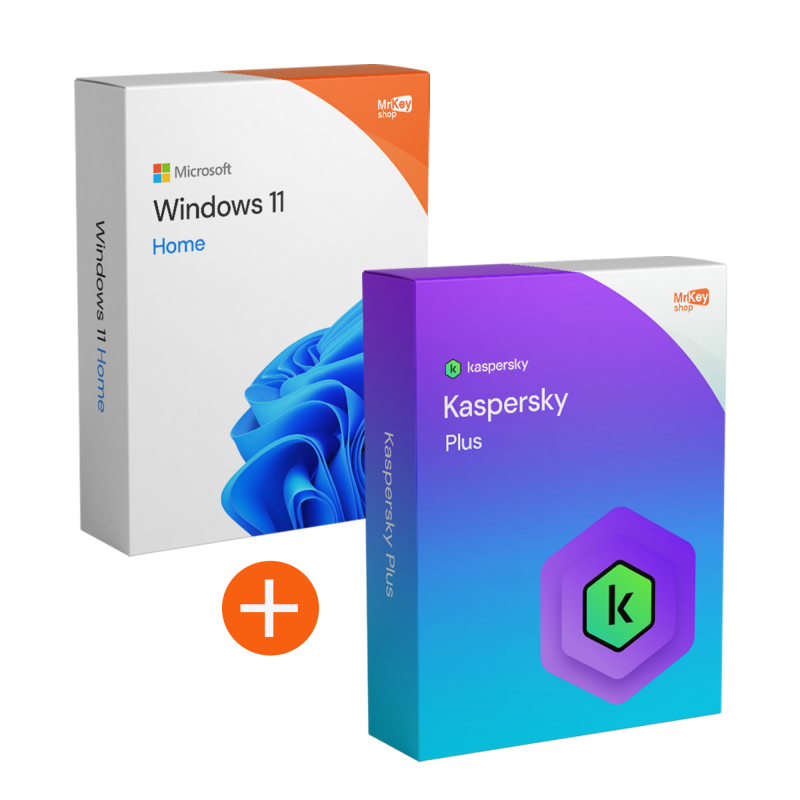





This bundle was created to solve a very real problem: you want a PC that works well and you want to reduce the risks that interrupt your activities (bad downloads, misleading links, exposed accounts, pop-ups and alerts). By combining Windows 11 Home with Kaspersky Plus, you start with a consistent setup: an updated operating system + security designed for everyday online use.
At Mr Key Shop, you will find original and guaranteed licences, secure transactions and a guided process for downloading, installing and activating. If you want to choose easily and get started smoothly, this is a “ready-made” bundle for you.
We created the Windows 11 Home + Kaspersky Plus 1 year/1 device bundle because, when you use your PC every day (including for gaming), the most frequent problems don't come from the hardware: they come from incomplete setups and fragmented choices. An up-to-date operating system is essential, but it's not enough if you browse, download files, manage accounts and shop online: all it takes is one bad link or unreliable download to end up with pop-ups, security alerts, slowdowns and time wasted “cleaning up”.
With this bundle, we wanted to simplify your choice with a coherent combination: Windows 11 Home to start with a modern environment and Kaspersky Plus to add immediate protection and privacy, on 1 device for 12 months. The benefit for you is clear: fewer doubts when purchasing, fewer steps and a more secure setup from day one, with clear instructions and free technical support in Italian and English when you need it.
The Windows 11 Home + Kaspersky Plus 1/1 bundle is ideal for gamers and PC users who want a simple, secure and ready-to-go setup: those who play online, frequently install apps and launchers, use accounts with sensitive data or make digital purchases. It also works very well for shared PCs: different habits (downloads, browsing, logins) increase risks, and constant protection reduces incidents that “dirty” the system and cause interruptions.
If there are also children in the house, the usefulness is even more evident: phishing and misleading pages related to ‘bonuses’, ‘skins’ or free content are among the most common risks. The goal is not to complicate your PC, but to make it more secure without changing your habits.
The idea is to give you a balanced setup: updated operating system + continuous protection. Here are the key points at a glance.
|
Software |
What you get |
Why it's useful |
|
Windows 11 Home |
|
Gives you an up-to-date and consistent base for your PC, reducing setup friction and daily management. |
|
Kaspersky Plus (1 device / 1 year) |
|
Reduces the most common online risks and helps protect accounts, payments and downloads. |
One of the exclusive benefits of this bundle is the integration of an unlimited Premium VPN within Kaspersky Plus. Unlike standard versions, you will have no daily traffic limits: you can browse in complete anonymity, hiding your IP address and protecting your sensitive data, especially when connecting to unsecured public Wi-Fi networks. This feature, combined with the structural security of Windows 11 Home, allows you to bypass geographical restrictions and enjoy your favourite streaming content wherever you are, with a military-grade encrypted connection.
We know that every frame counts for a gamer. That's why Kaspersky Plus includes a smart Gaming Mode that automatically recognises when you launch a full-screen game on Windows 11. The software instantly suspends scheduled scans, database updates and pop-up notifications, freeing up all CPU and GPU resources for your gameplay. You can be sure that you are protected from malware without experiencing any FPS drops or annoying micro-lag during intense matches.
Protecting access to your accounts (Steam, Epic, social media and banking) is just as vital as protecting your PC. This bundle includes a Premium Password Manager that creates unbreakable access keys and automatically fills them in for you. In addition, the Data Leak Checker feature constantly monitors the web and the dark web: if your email or credentials appear in a known data breach, you will receive an immediate alert with instructions on how to secure your accounts before hackers can use them.
|
Premium Feature |
What it offers in the bundle |
Benefit to the user |
|
Unlimited VPN |
Data traffic without daily limits. |
Total privacy and access to global content. |
|
Password Manager |
Encrypted vault for unlimited credentials. |
No more forgotten or weak passwords. |
|
Safe Money |
Secure browser for payments and banking. |
Transactions protected against keyloggers and theft. |
|
PC optimisation |
Cleaning of unnecessary files and startup management. |
Windows 11 always fast and responsive. |
Windows 11 Home offers a beautiful, modern interface, but to keep it running smoothly, you need a suite that does more than just ‘scan’. Kaspersky Plus acts as a system optimiser: it cleans up duplicate files, manages apps that slow down startup, and monitors the health of your hard drive/SSD. Combining these tools with the stability of Windows 11 means you have a computer that doesn't age, is protected from viruses and is optimised for performance every day.
When you buy a new skin or make a bank transfer, you can't afford to take risks. Thanks to Safe Money technology, Kaspersky Plus opens a secure, isolated window for your transactions. This shields your credit card details from keyloggers or malware ready to intercept your sensitive information. Combined with the security of the Windows 11 kernel, your online shopping finally becomes worry-free.
Purchasing from Mr Key Shop means choosing a reliable retailer and a simple and secure shopping experience. You can count on Trusted Shops protection (covering up to £2,500 per order) and verified reviews that confirm the quality of service and support: important aspects when you want to install and activate without complications.
Payments are protected by SSL encryption and you can choose from secure and convenient methods: PayPal (also in 3 instalments), Klarna, Amazon Pay, Apple Pay, Google Pay and credit/debit cards, as well as other methods available at checkout. Every order is covered by our money-back guarantee policy and includes free technical support in Italian and English.
After placing your order, you will receive everything via email with digital delivery: clear instructions, secure download instructions and activation guide. It is an eco-friendly solution that eliminates unnecessary shipping and packaging and allows you to get started right away.
If you want to complete your setup with complementary tools available on Mr Key Shop, you can also consider Bitdefender Total Security to strengthen protection in multiple scenarios, CCleaner Professional to keep your PC tidier and more responsive, EaseUS Partition Master to manage your disk and partitions more easily, EaseUS Todo Backup to create reliable backups and AOMEI Backupper Pro to automate data protection: always purchase with immediate delivery and support included.
Take your business to the next level with a solid and recognized partner in the original software licensing industry. With Mr Key Shop, you get access to exclusive price lists for resellers, special terms, and free professional support for you and your customers.
What's more, with MrKeyWallet, you can get extra credits on every top-up and further increase your margins: the more you invest, the more you earn. A system designed for those who really want to scale up.
Join the MKreseller programnow and discover all the benefits reserved for partners.
Windows 11 Home
Kaspersky Plus
After purchase, you will receive everything you need to get started via email: useful information, secure download links and clear instructions. The advantage is immediate: you avoid unreliable sources and download the correct versions by following a guided path.
The installation is designed to be straightforward: follow the instructions and proceed in the recommended order. In general, the best sequence is Windows → updates → Kaspersky. This reduces conflicts, avoids incomplete installations, and gives you a cleaner setup.
Activation makes the licences fully operational. Mr Key Shop provides clear instructions on where to complete the activation and how to avoid the most common errors. If an error message appears, it is usually caused by a skipped step, an unmet requirement or a conflict with existing software: follow the guide and contact support to resolve the issue quickly.
To activate Kaspersky Plus, you need to create or log in to a My Kaspersky account. This will allow you to manage your licence and locate your device in case of theft.
What do I get when I purchase the bundle from Mr Key Shop?
After placing your order, you will receive an email with everything you need to get started: useful information, secure download links and complete instructions for downloading, installing and activating the software correctly. Free technical support in Italian and English is included.
How do I download the software included in the bundle?
You will receive secure download links in the instructions. The advice is simple: only use the channels indicated, avoiding third-party installers or modified packages.
Does Windows 11 Home require a Microsoft account?
In its standard configuration, Windows 11 Home requires an internet connection and a Microsoft account during the first start-up. Consider this a practical requirement to have ready before installation.
Can antivirus software cause micro-lag while gaming? How can I avoid this?
This can happen if heavy scans or updates are running while you are gaming. The best solution is to schedule scans outside of gaming hours, reduce notifications during gameplay, and limit background activity.
How can I mute pop-ups and notifications while gaming?
Enable ‘Do Not Disturb’ on Windows and configure notifications to be more discreet. For Kaspersky, set preferences that reduce non-urgent alerts during use, when available.
Do I need to remove an old antivirus before installing Kaspersky Plus?
Yes, it is recommended: having two security suites together can create conflicts, slowdowns and activation issues. Remove the previous suite, restart and then install Kaspersky.
What can I check if activation fails?
Check your Internet connection, system date/time, Windows updates and that there are no conflicts with existing software. If the problem persists, follow the included guide and contact technical support.
Can I reinstall the software if I format my PC?
Generally, yes, by following the instructions again. Reactivation methods may vary depending on the manufacturer's rules and the type of licence: if you need to change your configuration or PC, contact support for the correct procedure.
How do I check that Kaspersky Plus is active on 1 device and how long it lasts?
You can usually check your subscription status and expiry date directly from your account area or from the application once activation is complete. If in doubt, you can check with support.
Checklist “Gaming ready” before installing
Common errors and how to avoid them
Gamer account protection: quick best practices
Does the included VPN have daily data limits?
No, the Plus version included in this bundle offers unlimited VPN traffic, allowing you to protect your browsing without worrying about consumption.
Does Kaspersky Plus check if my accounts have been hacked?
Yes, it includes data leak monitoring (Data Leak Checker). It alerts you immediately if your email or associated accounts appear in public hacker databases.
Can I use Kaspersky Plus on Windows 10 if I haven't upgraded to 11 yet?
Absolutely. Kaspersky Plus is fully backwards compatible with Windows 10. You can install it right away and it will continue to protect you even after you upgrade to Windows 11 Home.




 Chat with us
 Ita
Ita
 Eng
Eng
 Deu
Deu
 Esp
Esp
 Fra
Fra